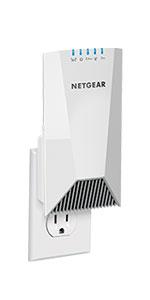
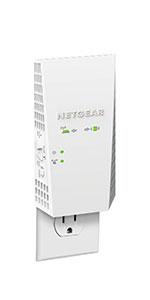
Desertcart purchases this item on your behalf and handles shipping, customs, and support to Cape Verde.
🚀 Elevate your WiFi game—coverage and speed that keep you connected everywhere!
The NETGEAR EX7500 is a tri-band AC2200 WiFi mesh range extender that boosts your wireless coverage up to 2300 sq.ft and supports up to 45 devices simultaneously. Featuring patented FastLane3 technology and seamless smart roaming, it maintains your existing network name for uninterrupted connectivity. Compatible with any router, it delivers speeds up to 2200 Mbps, ideal for heavy streaming and gaming, with a quick plug-and-play setup.


| ASIN | B0762QT7S6 |
| Best Sellers Rank | #338 in Repeaters |
| Brand | NETGEAR |
| Built-In Media | AC2200 Nighthawk X4S Tri-band Range Extender (EX7500)^Quick start guide, Quick start guide |
| Color | White |
| Compatible Devices | Router |
| Connector Type | RJ45 |
| Customer Reviews | 3.7 out of 5 stars 4,706 Reviews |
| Data Transfer Rate | 2.2 gigabits_per_second |
| Frequency Band Class | Tri-Band |
| Frequency Bands Supported | Tri-Band |
| Global Trade Identification Number | 00606449128765 |
| Item Dimensions D x W x H | 8"D x 4"W x 4"H |
| Item Type Name | Netgear Nighthawk X4S AC2200 Tri-Band WiFi Range Extender with Patented FastLane3 Technology, Smart Roaming (EX7500-100NAS) |
| Item Weight | 0.3 kg |
| Manufacturer | Netgear |
| Mfr Part Number | EX7500-100NAS |
| Model Number | EX7500-100NAS |
| Number of Items | 1 |
| Range | 2300 square_feet |
| Special Feature | FastLane3 Technology, Nighthawk Mesh Technology |
| Special Features | FastLane3 Technology, Nighthawk Mesh Technology |
| UPC | 606449128765 |
| Unit Count | 1 Count |
| Warranty Description | 1 year warranty |
| Wireless Communication Standard | 802.11ac |
| Wireless Compability | 802.11ac |
A**A
Expensive. Reliable and Fast.
I bought this extender at the same time that I bought an Orbi with one satellite. I figured that even if the Orbi did not work out, the EX7500 would be helpful with my then-current setup (four Apple wifi routers that could barely cover my home). The jury is still out on the Orbi system, as I have had to reset it a couple of times already, and it does not play all that well with all of my smart devices. BUT the EX7500 is a trouper. I have not had to do one thing to this extender beyond plugging it in and setting it up once. Setup itself was easy and took under five minutes. Adding it to the Orbi network increased my speed in the farthest ranges of my house by a good 50-75 Mbps. I've had other extenders that, for example, gave me duplicate IP address errors and/or constantly snatched my wifi connection. My Apple extenders let excluded MAC addresses onto my network unless I duplicated those settings for each extender. This one runs completely invisibly. It's probably the most troublefree extender I've ever owned. Seriously. It is wicked expensive, but it is the one piece of networking equipment I currently own, including my Apple setup and the Orbi, that I can definitely say that I am keeping.
C**B
Do yourself a favor and get a proper mesh system
Summary: After years with Apple Extreme Base Stations, I switched over to a Netgear Nighthawk X6 and loved its performance in our basically square 800 sf apartment. When we moved to a long, linear 1800 sf condo, I need something to extend our network to cover the master bedroom and back deck. Less than a year later, I'll never purchase another Netgear device. Installation: Gets a extra star here, simply because all you do is plug it in. Literally the only redeeming virtue this product has. Setup: This device uses a web interface to get it setup, which is different from the interface that you use to setup the Nighthawk Router. Like any web based router setup interface, its clunky, loads sporadically, and in dire need of a proper rebuild. It would take a half dozen tries to correctly connect to my router, regardless of being no more than 10 feet apart in direct sight-lines. And dealing with a triple band connection, it would inevitably connect to either the 2.4 ghz or the 5.0 ghz band, but not both simultaneously. Usage Oh where to begin. The SmartConnect setup is a surefire way to have a bunch of devices that can't properly navigate the different bands. They just wont connect at all. So go ahead and disable that from the get-go. The OneWifi name is how these setups should all work in theory but in practice with this device, its really just a great way to suffer constant service interruption with spotty handoffs. The extender will rebroadcast the same SSIDs, regardless of whether it has a connection to the router or not, so we'd find ourselves losing internet connection as we moved from one point in the apartment to another, despite having a full strength connection to the network. I was unplugging, resetting, reconfiguring or otherwise manipulating this extender to work with our router constantly. No matter if it was 10 feet away with direct line of site, 30 feet away with direct line of site, or 45 feet away with indirect LOS, connection between the extender and the base station was spotty at best. Even when it was working "properly" we'd be lucky to see 100 MBs down (on a 330 MBs connection) App: Our Nighthawk router required the Netgear Nighthawk app to be managed from my phone. Our Nighthawk extender required the Netgear Genie app to be managed from my phone. And you only new which device you're connected to, and thus which app to use, when you opened the app and got a "this device is not supported" error. Technical Support: This is where Netgear is truly laughable. The device comes with a one-year warranty and after CONSTANT issues, multiple ground-up network rebuilds, and as much dialing in as I could manage, I was still frustrated by terrible performance and called Netgear to see about getting a replacement unit, as clearly something was malfunctioning. Well, the only way to get a support tech to even talk about your issues and possibly get to a point where they will give you a return authorization on a warranty claim, you must sign up for a technical support contract. I spent over an hour arguing with a technician, telling him I wouldn't pay nearly 75% of the cost of the device, just to confirm that it is a piece of junk, and to just give me an authorization number. In the end, all he would do is email me a few tech support "articles" (roughly two sentences and some bullet points) that anyone who spent even a few minutes trying to troubleshoot their device on Netgear's website would have found. In the end... this device, and Netgear as a company, is garbage. If you have a Nighthawk router today and want to upgrade to a mesh experience, do yourself a favor and just sell your hardware and go purchase a vastly superior product. I picked up the eero Pro setup on Prime Day and not only was it stupid easy to set up, but in a month of use, we've had nothing but incredibly stable 330 MBs down performance in every corner of our home (and well out into the yard/street) and have never had to even power cycle any of the devices once. And all my devices that couldn't make heads or tails of Netgear's SmartConnect/OneWifi protocols have no issue navigating the eero. Mesh the way it's supposed to be.
P**.
[Edited - would not recommend]
****[Edit 4: Final Edit] I gave up. When it worked, it worked well. But like others on here, my internet went in and out way too much. With my wife and I working remotely full time now, I needed a reliable extender. This didn't cut it. I will concede that perhaps it is just my own house and not finding a good spot to cover the whole area. My house is about 3200 sq ft. so it is on the larger side, but between the verizon router/modem and this, it should be able to provide coverage. We constantly had problems - I constantly restarted it. The set-up is also weird. I ended up buying Amazon's Eero system and from the start it has been much much better. Save yourself the trouble and look into Eero - I got a set of three and it has been far superior. ***[Edit 3: Moved this up front because after a month it is most accurate. It is working absolutely perfectly. I think my issues before had to do with setup or me tweaking my wifi. I had some issues with my internet so reset everything (router included and network connections) and reset up the Netgear. I have had zero issues, no need to reset, never losing any connection at all. And my connection is excellent. I have absolutely no idea what needs to be done to set up correctly, but when done this thing is great. I think reviewing all the other poor reviews, if they try resetting everything it will fix their issues.] [EDIT 1: I have noticed that you do need to "refresh" the extender. I just unplug it for a few seconds and plug it back in. About once per day. ] [EDIT 2: I ran a network analyzer through Verizon. Before the extender I was getting device connection that were a mix of fair/poor. After finding the right location for the extender all device connections were "strong". Absent any hiccups in the future I will be extremely pleased with this purchase. It has extended the 5ghz range so that I can get stronger speeds.] Needing to work from home with COVID-19, I started using my home office for the first time (moved into my new home last September 2019). Unfortunately it is about as far from my router as possible in my home (router on second floor and office on the first). All the best rated routers were either sold out or would not be able to arrive for months. So I went with this option. I was nervous because all the reviews seemed to agree that there were a lot of problems with connections going in and out etc... and very few positive reviews had any substantive analysis about the product. That said, so far I have had nothing but improvement to my connection. My 2.4 and 5 ghz networks are meshed into one ssid name (I use Verizon Fios and it will auto-use whichever is the best for the device). The range extender also uses the same name so honestly I never really know what network I am connected into at any given time. But I have not noticed any drops in connection - my connection before maxed out at 2 bars and usually was on 1 bar but now it usually has full connection. I'm using a laptop connected into a docking station with monitor and other small devices so I am mostly staying in one place while I work. As for setup, I used the setup wizard via webpage rather than wps. It wasn't hard per se but I am not sure that I followed everything. I think my biggest problem is not really knowing what it is doing at any given time. You can go to a netgear webpage and it typically states that I am not connected to the extender but another page will list my computer as connected. But since my connection is good I can't complain too much. If you are reading this and are looking to extend your range for something like a home office, I think you will be pleased. My home is fairly large (over 3500 sq ft) so I needed something to extend my router's range. This has done a great job so far (will update if any problems come up). It sounds like there might be problems for people who are moving about and have different wifi names for the various connections. I cannot confirm or deny them.
R**Z
Works Great, Slightly Tricky to Setup with Apple Airport Express
I've been using a crummy ~$50 extender for quite awhile and finally broke down and got this one. I was somewhat worried that I'd have some problems at setup, which I did, but was able to overcome those with a bit off googling. My wifi router is an Apple Airport Express (Gen 2) and after initially setting up the extender as part of the same network (same network name/password/etc), it showed me as being connected but did not give me any internet connection. After fully going through setup again and the same results, I tried a different tack. On my third attempt, I set the extender up to have separate 2 and 5 Ghz networks of its own. From that point, everything worked as expected. My speed in my back yard office is blazing fast and I'm loving it. It probably seems unfair to expect that Netgear have instructions for connecting to every router type. I do wish they had better trouble shooting when you get to the "You're connected but don't have internet" screen. The fact that there were no suggestions for remedying this on the setup website or printed instructions caused some frustration. I hope this helps other folks though! I would definitely buy again and am pretty elated with the function!
D**.
Like some of the reviews
I've been using the Netgear Nighthawk X4S wifi extender for almost six months now. Like some of the reviews, I also have to say that when this extender works, it is great. The range is greater than my last extender, which was a pretty good unit. I decided to replace it with the X4S because of the better specs offered. The X4S is very easy to setup. The range is about 30% further than my previous extender and the wifi speeds are improvements. So it is very nice and by far the best home network extender I've used performance-wise. But all this is only true when the device is working properly. The extender for unknown reasons would only work for a week to three weeks, and then it would stop authenticating new connections. Only existing connected devices work. If the connected devices were to disconnect, they would also not be able to authenticate. Restarting the X4S by issuing a restart from the admin web console page, turning it off and on with the power button or unplugging it from the wall outlet and plugging it in again will resolve the issue. It would be nice if there is logging available on the extender to provide some clues to what is happening. I am luckier than some of the reviewers that are only getting a few hours of operation from the unit before a restart is required. I am hoping a future firmware update will fix the problem.
D**N
Worked almost perfectly the second time through the setup procedure.
So it did not work the first time through the procedure, it lost settings once it was unplugged due to a firmware update. I had to bring it back to the main room very close to the main router to set it up again, then seemlessly worked. A tip, If you have another MESH router, you must unplug it during the setup. You cannot set this up if you have a mesh router within signal range of this one or your MyWiFiextender link goes directly to the active one and will ignore the new one. I had to adjust the channels on my main router until I found a good channel that gave me a 90% signal strength in the intended location. This required going back and forth as once I chose the worng channel and lost connection I had to retrieve it and setup within range again. This was my own fault as I was tweaking it for the best link connection speed. I settled on 800Mb/s 5Ghz connection speed and 400Mb/s 2.4Ghz connection. I am seeing 358Mbs down and 325Mbs down with a 5Ghz connection on my wireless devices. My main router is giving my a wired 990mbs down / 990mbs up wired connection and 800mbs down / 810Mb up wireless connection when I am within the same or next room. Very Happy with this as an addition to my EX8000 triband mesh extender. Both do what they were intended perfectly and I now have full house coverage upsatirs and downstairs with 50 devices connected.
C**0
Wow!! The Netgear Nighthawk X4S AC2200 has finally solved my whole home coverage issues!
I have a 3200 sq ft / 2 story house and the wireless router is in my office that happens to sit on the side of the house upstairs. I have been battling this full house coverage issue for almost 6 years now. Placing the router in the center of the house is not ideal for me. The internet coverage from my first wireless router was bad, so I tried (2) traditional repeater/exenders and still had issue getting internet to our master bedroom on the other end of the house on the lower floor. I upgraded to a Netgear Nighthawk 1900AC router and that helped...it's a strong router. A signal of 80Mbs at the router would still diminish to 5-10 Mbs in the bedroom with constant dropouts. I upgraded internet to 170 Mbs as a bandaid... and that gave me 15-20Mbs in the bedroom but still with random dropped signals and frustration. i again tried repeaters, extenders, etc. I finally ended up hardwiring my Chromecast and smart TVs downstairs because the signal just wasn't reliable enough. I finally caved in and set up my traditional Netgear Extender as a WAP. Now we had strong wireless in the bedroom but had to transfer back and forth from one SSID to another wish is a pain. There had to be a better way. I had read about the new Netgear "Mesh" Extender. Its confusing because "Extender" is a negative term after experimenting with them above. Is this "Mesh" or a "traditional Extender"? I had to do a lot of research to make sure that this extender was different and that it truly was Mesh. I even looked at going to a full mesh system and ditching the Nighthawk. After watching several videos, I realized that the Mesh extender might be the real deal....could I really get 1 SSID and full speed in my bedroom??? Well, this dream has finally come to fruition. I finally bought the Netgear Nighthawk X4S AC2200 Mesh Extender. It was expensive at $178 but I had high hopes. It synced to my Nighthawk router in a matter of minutes by pressing a few buttons. I plugged it in downstairs just outside my bedroom. All I can say is WOW! My ISP gives me about 170-180Mbs at the modem. I was now in my bedroom instantly getting 175Mbs with no lag! In fact, the entire downstairs now is covered easily at 100Mbs+ on the 5Ghz band. One SSID. Easy setup. Seriously! 6 years of frustration finally solved. Thank you Netgear....this Mesh Extender is the real deal!
L**I
Works just fine in transparent extension mode until it's power cycled
This thing initially comes up with its own open WiFi network. You "join" that network and set it up to connect with your router. You have a choice between a manual setup or running the Genie. I tried both methods and was successful in setting it up to extend my router's 2.4GHz and 5GHz WiFi networks using either method. In my configuration, my router uses the same SSID for both WiFi nets and the same password. I run in 802.11n-only mode on each frequency band. I set the 2.4GHz signal to Channel 6 with a single 20MHz channel (I've also tried this successfully with a 40MHz channel). On the 5GHz band, I use channel 161 and a 40MHz channel width. It's a fairly simple and normal config on the router side. Everything worked fine after the initial extender setup. The extender connected to both router signals as expected. Running a speed test from my MacBook Pro client connected to the extender gives me 95% of the throughput that I measured when previously connected directly to my router at a close physical distance. This test was run over the 5GHz band. You should be aware that the extender isn't a completely transparent bridge to your router's network. Unless you use a static IP on your client, when you connect to any WiFi network, your client generates a DHCP request to obtain an IP address. Most routers cache the Mac address that comes with that DHCP request so when the DHCP lease expires and the client renews the lease with another DHCP request, it will get the same IP address. The extender will replace the first 3 hexadecimal numbers (octets) in the MAC address with its own OID and then forward the request to your router. This will result in your client being assigned a different IP address when it connects through the extender than when it connects to your router. For most people, this isn't an issue but it can and will break some applications as you walk around your house and switch between the extender and the router. Remember, in transparent mode, your router and extender use the same SSID so your extender sort of acts like an access point (AP). My issue with this extender device is that it doesn't recover from a soft or hard power cycle. A soft power cycle is performed by connecting to the extender and logging in to its management app using a special URL that the extender traps for this purpose. A hard power cycle is done by unplugging the extender and plugging it back in, thereby simulating a real power outage. When the extender comes back up from a power cycle, it appears to reconnect with the router. However, on the client side of the extender, it often has a totally different IP network inconsistent with the router's network that it bridged and extended before. For example, my router's IP network is 10.168.123.0/24, and initially, the extender extended that network to its clients with the aforementioned DHCP request MAC address twiddling. After the power cycle, it comes back up with a 192.168.0.0/16 network that doesn't route to the router's 10.168.123.0/24 subnet. Furthermore, now the damn thing seems to be running its own DHCP server for that private network now. My MBP client can't connect through the extender to my router so no access to my 10.168.123.0/24 LAN subnet or to the internet beyond after the power is cycled. Sometimes after a power cycle, it won't even assign its clients an IP address on its isolated 192.168/16 subnet. Yes, I'm on the latest firmware. This is totally unacceptable behavior.
J**E
Excelente producto.
Ya instale el extensor para usarlo con mi router y me he quitado los problemas que tenía con la falta de seña. Muy buen producto y fácil de instalar, mantiene el mismo nombre de red y password que el router.
D**.
Awful
Do not buy this product it’s awful actually made my Wi-Fi worse!!
E**.
No cumple con lo que esperaba
El producto promete un mejor desempeño que los extensores de Wifi económicos y comparándolo con el que tenía funcionando de gama baja, no me da ni mejor cobertura ni mejor velocidad.
R**E
Producto de primer calidad
Increíble producto, fácil de instalar y quede muy sorprendido con cómo cambia la velocidad del internet y la cobertura, increíble para jugar Xbox live sin lag y reproducir por Chromecast
M**Z
Buena calidad
Es de buena calidad; sin embargo, no da el alcance o cobertura que indica en la publicación, ya que después de los 13 mts empieza a fallar la señal, por lo que sólo es un poco mejor que el anterior que tenía y que costaba 50% menos
Trustpilot
2 days ago
5 days ago