We remain fully operational. Our teams are working around the clock to ensure your deliveries continue safely.

DOWNLOAD THE APP


Copyright © 2025 Desertcart Holdings Limited
DOWNLOAD THE APP
Buy anything from 5,000+ international stores. One checkout price. No surprise fees. Join 2M+ shoppers on Desertcart.
Desertcart purchases this item on your behalf and handles shipping, customs, and support to Cape Verde.
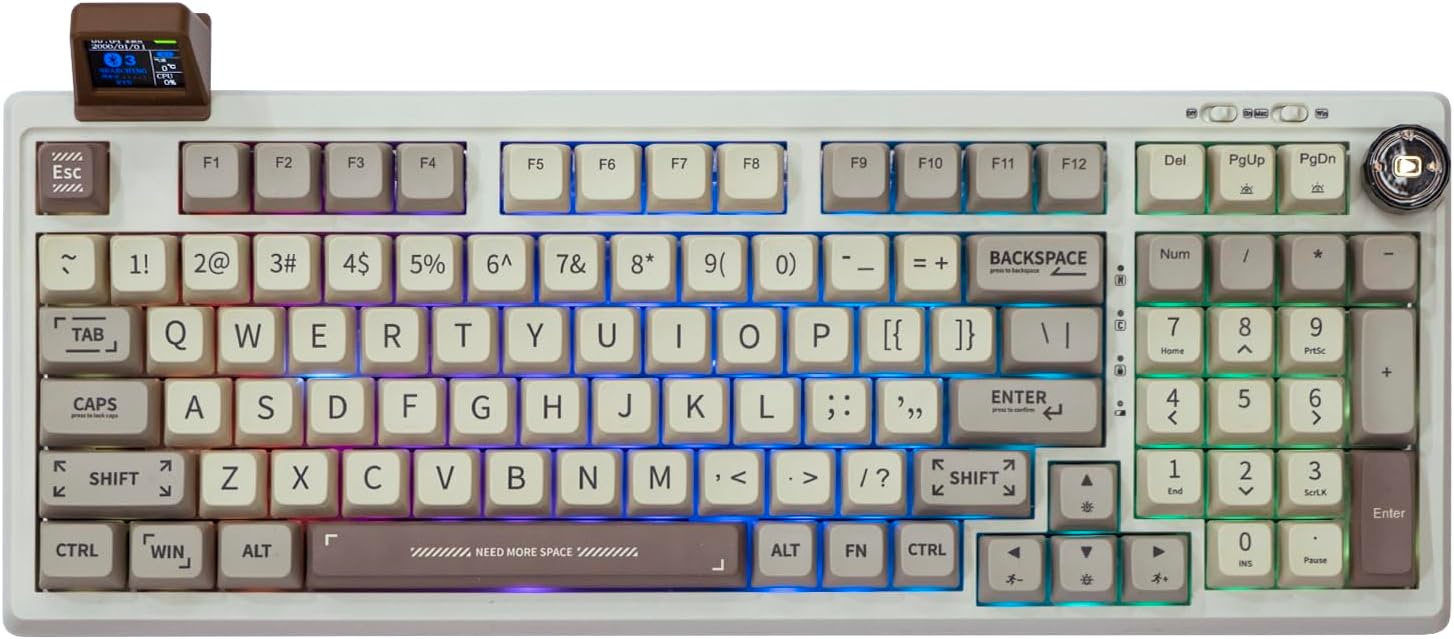
🎮 Elevate your desk game with the RT100 — where retro charm meets next-gen customization!
The EPOMAKER RT100 is a 97-key gasket-mount mechanical keyboard featuring a detachable smart TFT-LCD display, a fully customizable 360° media knob, and triple connectivity options (Bluetooth 5.0, 2.4GHz wireless, and USB-C). Designed for both Windows and Mac users, it offers hot-swappable Kailh sockets with custom Flamingo switches, a robust 5000mAh battery, and premium 5-side dye-sub PBT keycaps with an ergonomic MDA profile—perfect for gamers, coders, and keyboard enthusiasts seeking a compact yet powerful typing experience.


| ASIN | B0BQJF5G4X |
| Additional Features | Backlit, Ergonomic, Hotkeys and Media Keys, Rechargeable, Volume Roller |
| Antenna Location | Gaming, Programming |
| Best Sellers Rank | #6,864 in Video Games ( See Top 100 in Video Games ) #520 in PC Gaming Keyboards |
| Brand | EPOMAKER |
| Built-In Media | Keycap Puller, USB Cable |
| Button Quantity | 97 |
| Color | RT100 Retro |
| Compatible Devices | PC |
| Compatible Operating System Family | MacOS, Windows |
| Connectivity Technology | BT, USB-C |
| Customer Reviews | 4.0 out of 5 stars 331 Reviews |
| Enclosure Material | Plastic |
| Hand Orientation | Right |
| Is Electric | Yes |
| Item Dimensions L x W x H | 12.99"L x 4.57"W x 0.98"H |
| Item Weight | 1.42 Kilograms |
| Keyboard Backlighting Color Support | RGB |
| Keyboard Description | Gaming |
| Keyboard Layout | QWERTY |
| Manufacturer | EPOMAKER |
| Mfr Part Number | HU-XI-201 |
| Model Name | RT100 |
| Model Number | RT100 |
| Number of Keys | 97 |
| Number of Sections | 2 |
| Power Source | Battery Powered |
| Recommended Uses For Product | Gaming, Programming |
| Series Number | 100 |
| Special Feature | Backlit, Ergonomic, Hotkeys and Media Keys , Rechargeable, Volume Roller |
| Style Name | Classic |
| Switch Type | Custom EPOMAKER Switch |
| Theme | Retro |
| Total USB 2.0 Ports | 1 |
| Unit Count | 1.0 Count |
| Warranty Description | 1 year warranty |
P**.
It sounds relaxing to me.
I purchased this like new . I like the retro look and the quality of the keyboard. I also like the sounds of the switches. One of the switches was faulty , so i ordered a new kit and replaced it. Now it runs great.
A**N
Mostly awesome. Only a couple small complaints.
This keyboard is awesome. The key presses sound really gpod. Mine has the flamingo switches and they aren't clicky, they're clacky if that makes sense. The switches are a bit touchy, it's easy to make a mistake while typing because there isn't much resistance in the switches. The screen is really cool but I was under the impression that it tells you your CPU temp, but it only tells you the % of CPU usage, and the temp is the local weather temperature in your area. The software isn't the best either. You can't set it to run at startup. That means in order for the temp and CPU usage to work, Everytime you turn your PC on, you have to launch the software, set the location, and sync the system information if you want the weather/CPU Usage to work. It's annoying. The custom keyboard RGB feature definitely isn't easy to use, but the stock RGB designs are cool and the RGB looks good. The media knob is cool too. Plus, the USB C cable quality is awesome. They definitely killed it with the cable. It's like a rubber cable with some kind of metal housing at each end. Epomaker has definitely made a huge step in the right direction I think, now they just need to fix the software this keyboard would kill the competition.
M**H
Best keyboard out of the box!
Had been shopping around for a new keyboard. These “hipster” style keyboards are usually long on looks and short on functionality but this delivered for sure. Very well made. Sturdy. Even the cable is rubber wrapped and feels like it will last forever. The board itself is a dream. The keys are firm but quiet. I love the media knob and everything worked out of the box. I’ve only had it about a week so can’t speak to long term durability but so far I’m very very pleased. Couple of things that bumped it down a star, first the mini screen is cool but the viewing angle is kinda strange. It’s almost at a right angle and so I’m constantly having to hunch down to get a good look. A screen with adjustable viewing angle would put this over the top. So I ended up not using it. The second thing is when I do the white stable light pattern there is noticeable flickering. It’s the only color that does it. Couple small things but still this is one of the best keyboards I’ve ever bought and worth the price. Highly recommend.
L**A
Best keyboard!
The keyboard is so smooth and I love the sound it makes. It's the best size, it's not huge but it still has all the keys I wanted. Its so easy to use it wirelessly, the battery is great but I recommend using wired if you're gaming. It's so cute and Im obsessed with the mini display. The driver makes so easy to customize the lighting and display. Plus it's pretty light but really sturdy.
T**N
1 in a 1000………..chance at getting a working keyboard
I’ll be honest I’ve been eyeing this keyboard for a very long time, but already having a mechanical keyboard that I was content with. I held off for quite a while and finally pulled the trigger just a few days ago (03/22/24). Upon arrival, I plugged the keyboard in with the supplied USB cable and windows was consistently disconnecting and reconnecting. After restarting my computer I got a notification that USB device was not identified. Now I work professionally as an IT technician, so I immediately tried to ensure all drivers were correct and even reinstalled any of my keyboard drivers, basic ones included. Upon trying different ports a USB 3.0 port did work and I was able to make a connection. First thing I did was obviously give it a typing test and immediately keys would act as if you had held them down for multiple seconds after releasing, making it impossible to type at all. Switching to the 2.4ghz Receiver did fix this, but I didn’t buy this to only use it wireless. To attempt to fix these issues, I downloaded the latest version of the driver and was prompted with a firmware update. I ensured to run all software admin and the firmware failed to update. After only 2 to 3 attempts the keyboards, the LEDs became very dim the battery light was a consistent red. No matter whether I plugged the keyboard in, turned it off or on, left it charging on a USB power bank, connected it to another PC. Sadly, however, none of this worked in this keyboard was essentially and totally bricked. ** Now I did immediately have Amazon return and replace for the exact same model in my new device is working without issue so far as of (03/25/24). The typing experience is absolutely phenomenal. The keys feel and sound fantastic and the look of the board is amazing. There is also relatively light while ill still feeling well built. I saved all of this feedback for the end of the review though, because unless the keyboard is functioning, none of this really matters. ** Sidenote, the RKS 98 is the closest alternative and I would even say cousin to this keyboard and it is far superior. I actually ordered it the same day I ordered my replacement of this one just in case. Currently currently keeping both of the keyboards that my RT 100 does not die shortly after the return period ends…
A**I
Mixed review
I had to jump through several hoops to get this keyboard to work. First off, the keyboard only works on USB 2.0 ports (and supposedly 3.0 however my computer only has 3.2 ports so unable to test if that is true.) If you plug it in to anything else, it will continuously restart. Using a 2.0 port on my computer worked but it still randomly restarted from time to time. The only way I was able to get a stable connection is by using a USB 2.0 hub on one of my 3.2 ports. The Bluetooth dongle it came with did not work either. I tried using Bluetooth built into my PC and it worked, but I don't want to have to recharge a keyboard continuously so I kept it plugged in to my 2.0 port but my computer still played the disconnecting sound randomly when it would originally try to restart itself. Using a hub bypassed all these problems. Every time the keyboard restarts, the driver software crashes as well. Which means the little screen it comes with fails and the weather (which says "temp" but that is referring to the temperature of the weather in your town and NOT your CPU temperature as well as the CPU % will both read 0 if the software crashes. My space bar was also broken out of the box. It would not press down or register. After investigating, the rubber spacers they put in were not in all the way. After removing the key, the key switches copper pins were bent flat and I had to unbend them to push back into the keyboard and then reattach the space bar. Then the space bar started sticking. I removed the rubber spacers all together and now it works flawlessly. Also, you can not set the time to be 12-hour format which is a little annoying for a $100 keyboard. Besides all of the issues and troubleshooting, it is finally stable. The keyboard is still nice. The key caps have a good feel and typing on it feels very smooth. The color is really nice and matches the rest of the matcha green aesthetic I was going for with my setup. The key caps and switches are super easy to remove with the tool that it came with. The little screen is unique and definitely fun to play around with. Despite the customization for what is on the screen besides the picture, the information is still useful. The play button is really unique as well and can play/pause anything even when you're not in that program/tab. All around, solid 3 star keyboard. Would be 5 stars if it wasn't such a hassle to set up and offered more customization.
N**S
Difficult to start
The keyboard is worth every penny. I had a very difficult time getting the screen working, I didn’t know I had to do a firmware update on it. But really I love this!!
N**I
Nice and satisfying
Starting this off. I see a ton of complaints about the software. When I first used it. Yeah it didn't work. But if you want the screen to work. You need to first install the drivers off their site and then update the software. Then hard reset your computer and it should work perfectly fine. The keyboard lighting setting is easy to work. Drag on the keys you want colored. Then click "upload to dynamic light". Then repeat. The keyboard itself feels great and is satisfying to type with. I do recommend getting a wrist rest with it, then again. That's just me.
Trustpilot
4 days ago
1 week ago